

Nimply Logo

🎙️ For podcasters

Social media for podcasters: one episode, a week of posts

You already made the hard thing — an hour of real conversation. Social media for podcasters shouldn’t mean making eight more things by hand. Nimply explodes each episode into platform-native parts, drafts them for your approval, and schedules the wave around release day.

Exploded view

Anatomy of an episode, in parts

Treat the episode like an assembly: one source unit, five components, each machined for the platform it ships to.

Source unit · EP-042

This week’s episode

60 minutes of conversation — the only part you make by hand.

▼ exploded by the Content Repurposer — lineage tracked ▼

  1. PT-01

    Clip moments

    The three moments listeners will actually stop scrolling for, spotted in your transcript — with scripts and captions drafted for the clips you cut.

    Shorts · Reels · TikTok

  2. PT-02

    Quote cards

    Your guest's sharpest line, set in your brand style by the studio's image tools.

    Instagram · Threads · X

  3. PT-03

    Thread

    The episode's argument rebuilt as a native thread — a payoff per post, not a link dump.

    X · Threads

  4. PT-04

    Carousel

    Key takeaways as swipeable slides — images for Instagram, a document-style PDF for LinkedIn.

    Instagram · LinkedIn

  5. PT-05

    Discussion post

    The episode's open question, reframed to start replies instead of announcing a link.

    LinkedIn · Facebook

Illustrative breakdown — every part is a draft until you approve it.

Release day

The ritual, without the all-nighter

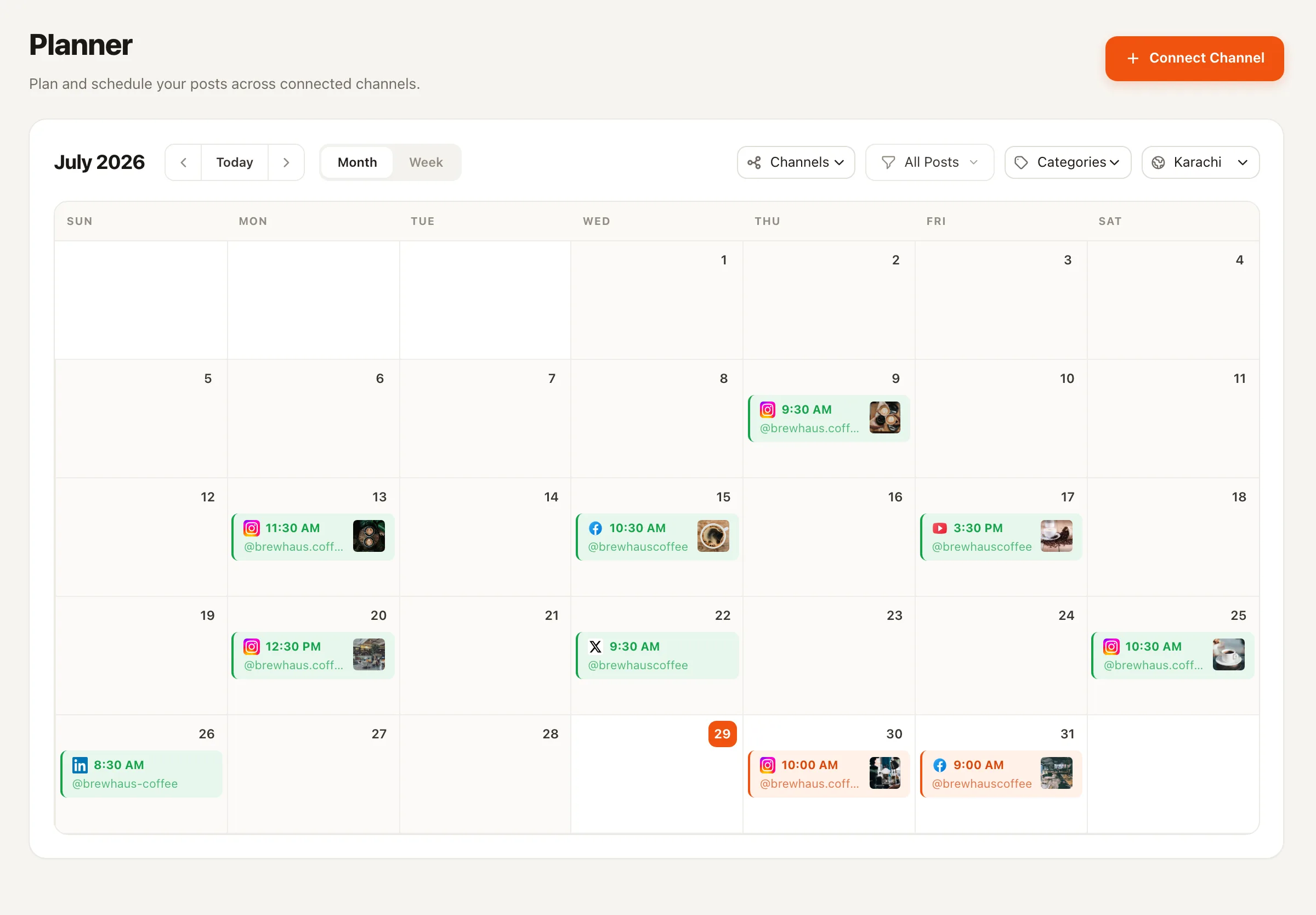
Every podcaster knows the eve-of-release scramble: clip the moments, caption everything, post everywhere, then collapse. With Nimply the ritual becomes a review session. The Content Repurposer drafts the parts — the same flow as repurposing a YouTube video, which is exactly what a video podcast is — you approve and tweak, and the planner staggers the wave: announcement at launch, clips through the week, the thread when the conversation peaks. If your show lives on YouTube, Shorts slot straight into the same calendar.

Nimply's planner calendar with an episode's derivative posts scheduled across the week
Release week on the planner: one episode's parts, staggered across platforms.

Between episodes

Your back catalog is a content library, not an archive

Episode 12 is still someone’s favorite episode — they just haven’t heard it yet. The Evergreen Recycler agent resurfaces posts about your proven episodes on a cadence you set, so off-weeks and season breaks don’t read as silence. Evergreen recycling runs on the same rail as everything else: drafted, approved, scheduled.

The feedback loop

Listener questions are next season’s outline

The best episode ideas arrive as comments and DMs. Capture them as cards on an Ideas board, let the Trend Scout agent add sourced angles from 2,000+ curated industry articles, and your planning session starts from a full board instead of a blank page. A card that resonates becomes a post today — and an episode next month.

After the episode drops

The comment section is part of the show

A good episode starts conversations you’re not in the room for. The Community Moderator agent watches your YouTube comments, hides the spam, and drafts replies to the listeners worth answering — comment moderation on the same draft-first rail as everything else. And when the conversation moves to the show’s Facebook or Instagram — comments and DMs alike — it lands in the unified inbox as one triaged queue, with drafted replies waiting for your send.

The production team

The team drafts. The host approves.

Most shows don’t stay solo — there’s a co-host, an editor, a VA. Nimply workspaces give each of them a role (OWNER, ADMIN, EDITOR, VIEWER), so your editor can draft the release-week posts while final sign-off stays with you. The approval workflow is the same rail the agents ride: draft → pending approval → scheduled, and nothing publishes without the host’s yes.

Social media for podcasters — FAQ

How does Nimply turn an episode into social posts?

You paste your episode transcript (or point the agent at the show's published posts) and the Content Repurposer drafts platform-native derivatives — it identifies the clip-worthy moments and writes the scripts and captions for the clips you cut, plus quote angles, threads, and carousel outlines — each written for its destination rather than copy-pasted. Every draft keeps lineage back to the episode and waits in your approval queue before anything is scheduled.

Does anything get published automatically?

No. Every agent in Nimply is draft-first: the flow is always draft, then your approval, then schedule. Agents never publish directly, and each run shows its AI-credit cost transparently.

Which platforms can I schedule episode content to?

YouTube (including Shorts), TikTok, Instagram feed, Reels, and carousels, Facebook, LinkedIn, Pinterest, Threads, and X — all from one calendar with best-time queues, so the release-day wave and the between-episode drip both run on schedule.

What happens to my back catalog between episodes?

The Evergreen Recycler agent resurfaces posts about your proven episodes on a schedule you control, so the feed doesn't go quiet in an off week. Recycled posts follow the same draft-and-approve rail as everything else.

Where do episode ideas fit in?

Ideas boards. Listener questions from comments and DMs can be captured as idea cards, and the Trend Scout agent files sourced angles from 2,000+ curated industry articles — so the topics your audience is already asking about become next season's episodes and this week's posts.

Can my editor or co-host approve posts too?

Yes — Nimply workspaces support multiple members with roles, so a co-host, editor, or VA can draft and you can approve, or the other way around. The approval workflow is the same rail the agents use.

Make the episode. Approve the rest.

Sign up free, hand your next episode to the Repurposer, and watch release week assemble itself on the planner — pending your approval.