

🤝 For marketing teams
A social media collaboration tool where agents are teammates — with the same rules
Most teams run social on a spreadsheet, a chat thread, and hope. Nimply is a social media collaboration tool built around one idea: every post — whether a person or an AI agent drafted it — moves through the same lanes, past the same approval gate, onto the same shared calendar everyone can see.
One post, four lanes
The social media workflow, drawn as swimlanes
Follow one post from brief to published. Notice lane two: it doesn’t matter whether a writer or an agent occupies it — the gate in lane three applies either way.
Strategist
ADMIN
Files the brief as an idea, assigns a category, picks the slot on the shared calendar.
IDEAWriter or agent
EDITOR · AI
Human writer — or the Carousel Designer / LinkedIn Ghostwriter — turns the brief into a draft. Same lane, same rules.
DRAFTReviewer
ADMIN
Reviews in context of the whole calendar; approves, or sends back with notes. Slack gets pinged so nothing stalls.
PENDING APPROVALPublisher
SYSTEM
Approved posts schedule into best-time queues and publish on the rail — with the category's hashtag set attached.
SCHEDULED → PUBLISHEDThe lanes work because permissions back them up. A Nimply workspace has four member roles — OWNER, ADMIN, EDITOR, and VIEWER — so the intern can draft without being able to publish, the reviewer can approve without touching billing, and the stakeholder who “just wants to see what’s going out” gets a read-only view instead of another seat in the editing tool. Guardrails live in the structure, not in a shared doc of rules everyone forgets.
The full pipeline is the approval workflow — and the broader social media workflow it belongs to.
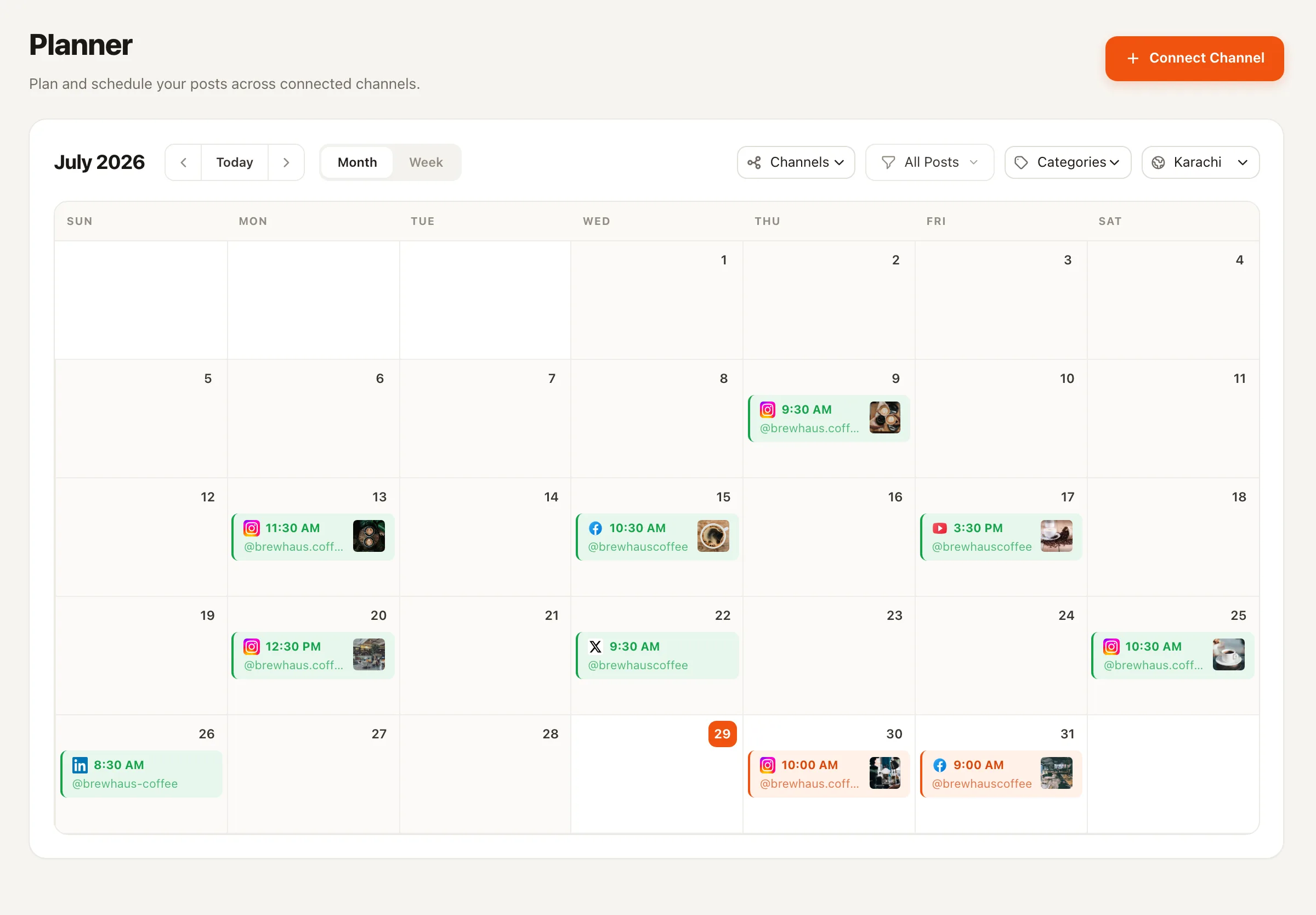
Shared visibility
Categories turn the calendar into a conversation
When every post carries a category, the month view answers the questions that usually take a meeting: are we heavy on promo this week? Where did the educational content go? Who owns the gap on Thursday?
Month and week views everyone shares
Strategists see the shape of the month; writers see their deadlines; stakeholders with VIEWER access see everything and break nothing.
Best-time queues and evergreen slots
Approved posts flow into queues so scheduling debates happen once, as policy — not per post.
Bulk CSV to migrate the old sheet
Your existing spreadsheet imports in one pass, so the switch doesn't cost a planning cycle. See the shared content calendar in detail.
More on the social media content calendar.
Headcount you don’t hire
Agents join the team — under the team’s rules
Adding an AI agent to a Nimply workspace is like adding a very fast, very literal contractor: it produces drafts, it never publishes on its own, and its work costs are visible per run.
✍️ LinkedIn Ghostwriter
Drafts thought-leadership in your exec’s voice — then waits in the reviewer’s lane like everyone else’s work does.
🎠 Carousel Designer
Turns a brief into branded slide drafts, so design capacity stops being the bottleneck between strategy and calendar.
🔔 Slack & Telegram nudges
Automations notify the channel your team already lives in when a draft lands or an approval is waiting — with a test simulation mode to dry-run the flow before it goes live.
Marketing teams — FAQ
What roles and permissions does a workspace support?
Four member roles: OWNER, ADMIN, EDITOR, and VIEWER. Editors create and edit content but publishing runs through the approval workflow; viewers see the calendar and content without touching it. That maps cleanly onto a marketing team's strategist / writer / reviewer / stakeholder split.
How does the approval workflow actually gate publishing?
Posts move through explicit states — draft, pending approval, scheduled, published. A post that hasn't been approved doesn't get scheduled, full stop. Reviewers approve or send it back with the context of the whole calendar in view, not a screenshot in a chat thread.
Do AI agents bypass the review step?
Never. Agents in Nimply are draft-first by design: a Carousel Designer or LinkedIn Ghostwriter output enters the pipeline exactly like a human writer's draft and waits at the same approval gate. Agents never publish directly, and every run shows its credit cost so nothing happens invisibly.
How does the team stay aware of what's moving?
Two ways: the shared calendar itself — month and week views, with category colors showing the mix at a glance — and automations that push notifications to Slack or Telegram when something needs attention, so approvals don't die waiting in an unopened tab.
Can several brands or regions share one setup?
Each brand or region can be its own workspace with its own channels, members, and approval chain. People can belong to multiple workspaces, so a central team can oversee several brands without mixing their calendars or permissions.
What replaces the content spreadsheet?
The planner: a shared month/week calendar with categories, best-time queues, hashtag sets, evergreen recycling, and bulk CSV import for migrating what's already in your sheet. The spreadsheet's one real feature — everyone can see it — comes along; the silent overwrites don't.
Retire the spreadsheet. Keep the visibility.
Set up roles, gates, and one shared calendar in an afternoon — then add agent teammates that follow the rules you wrote.