

📘 Use case · Facebook
Schedule Facebook posts from a queue that refills itself
That’s what a week on a queue looks like — illustrative, but the mechanics are real: schedule Facebook posts into preset slots once, batch the drafting in one sitting, and let the Evergreen Recycler agent re-draft the durable stuff for your approval. The page stays alive; you stop being its life support.
Facebook Pages · publishes automatically · CSV import for backlogs
Page queue
next slot: Mon 9:00- Mon · 9:00Behind the counter: how we prep for the weekPhotoScheduled
- Wed · 12:30Customer question of the week — answeredEvergreenScheduled
- Fri · 8:45Weekend hours + what's new this weekLinkApproved
- Mon · 9:00Team intro: meet the person behind the repliesPhotoDraft
Reorder the queue and the times reshuffle. Approved evergreen re-drafts take open slots.
The problem with “I’ll post it later”
Facebook Pages don’t die dramatically — they just go quiet
Nobody decides to abandon their page. It happens one busy Tuesday at a time: the post you meant to write gets bumped, the gap grows to a week, and the page starts looking closed to anyone checking whether you’re still in business. Posting by hand means re-making the same three decisions — what, when, where’s the link — every single time, forever.
A queue inverts that. You make the “when” decision once, batch the “what” on your own schedule, and Nimply’s social media scheduling tool handles the publishing — directly and automatically, at the scheduled time, every time.
Inside Nimply
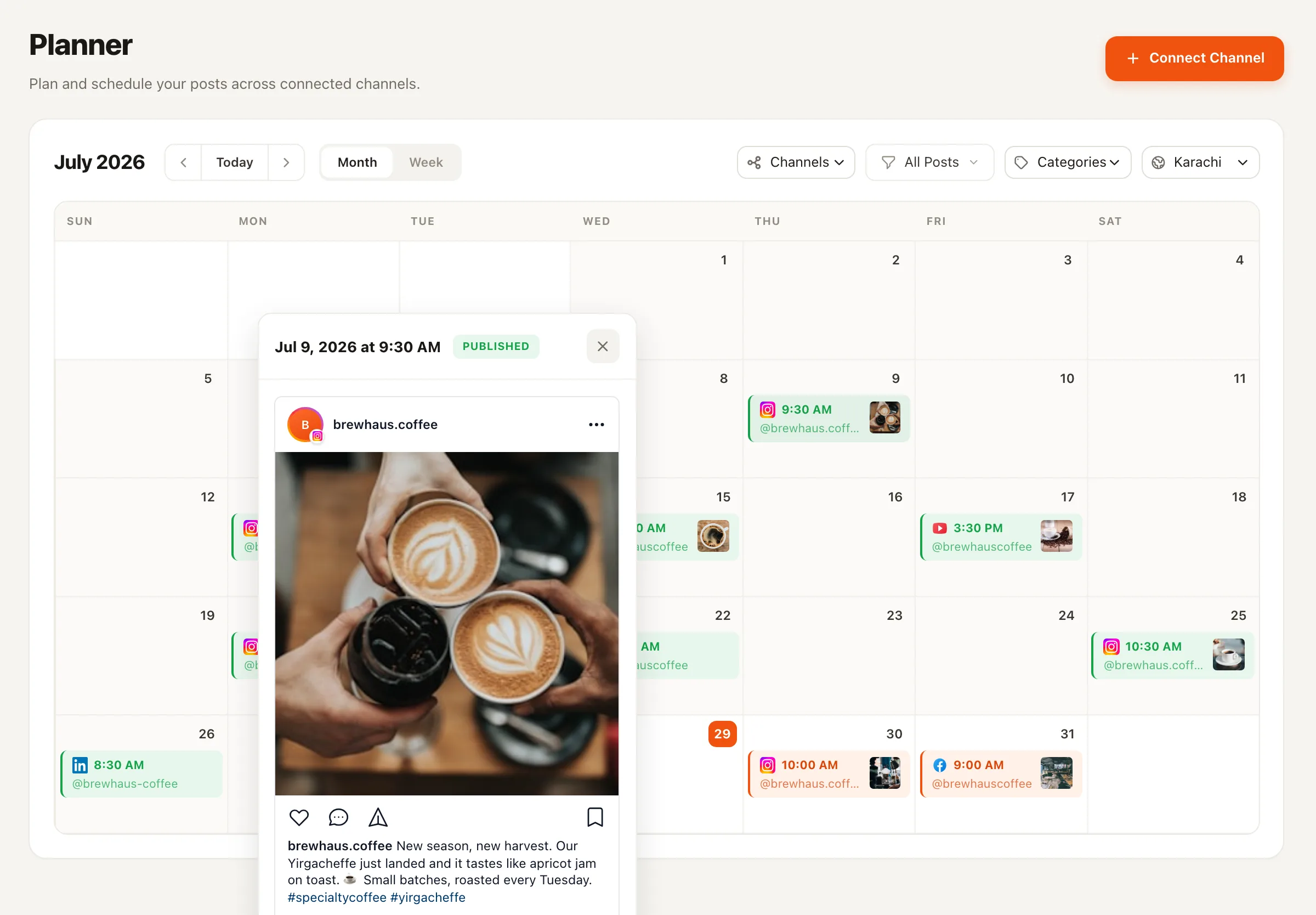
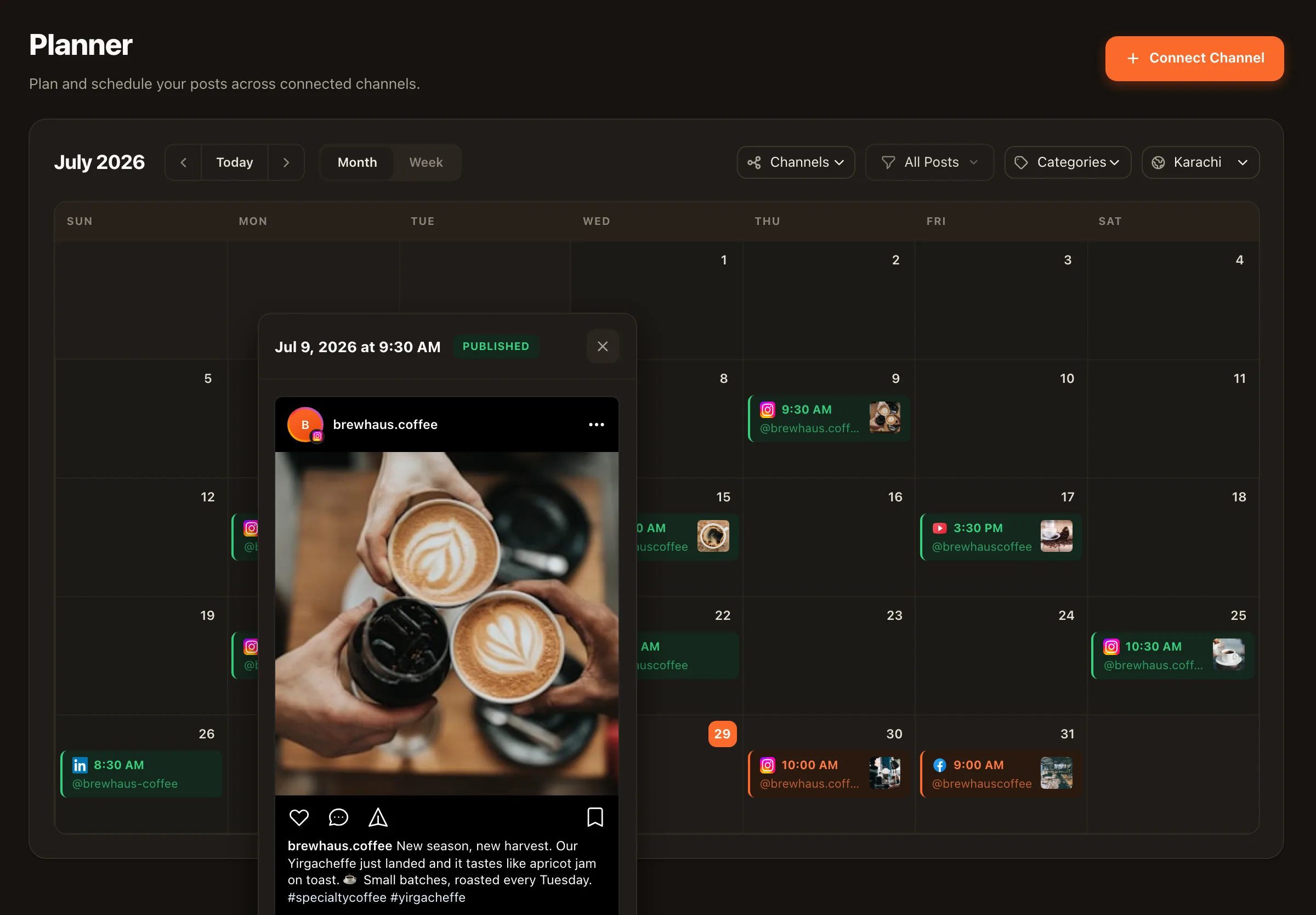
Every queued post, inspectable before it ships
Open any post on the calendar and see exactly what will go out: the copy, the media, the scheduled slot, and its approval state. Drafts wait for sign-off if you use the approval workflow — nothing publishes unreviewed, whether a teammate wrote it or an AI agent drafted it.
Sharing links? The built-in link shortener applies short links at publish time, and RSS import can turn your blog’s new articles into queued, editable drafts.
Setup
Five steps to a self-running page
Honestly counted — the connection takes a minute, and the rest is the content work you’d be doing anyway, just batched.
- 1
Connect your Facebook Page
One OAuth click. The Page appears as a channel with its own calendar row and queue.
- 2
Define your queue slots
Pick the recurring times you want the page active — that's your posting cadence, decided once instead of per-post.
- 3
Fill the queue
Draft posts in the composer, or import a CSV backlog in one go. Each post takes the next open slot.
- 4
Put the Evergreen Recycler on the durable ones
Tips, FAQs, and offers that don't expire become fresh re-drafts — the agent ranks them by real engagement and files drafts for your approval.
- 5
Let it run, check in weekly
Posts publish automatically at their slots. Your job shrinks to a weekly top-up and the occasional drag to reschedule.
♻️ The back catalog advantage
Your best Facebook posts shouldn’t retire after one shift
Most page content is evergreen whether you call it that or not — the FAQ answer, the how-to, the origin story. The Evergreen Recycler agent keeps those working: it ranks your back catalog by real engagement, re-drafts your best performers fresh instead of repeating them verbatim, respects recycle cooldowns, files them as drafts, and waits for your approval. Agents never publish directly — draft, approval, schedule, always.
Scheduling Facebook posts — FAQ
Does Nimply publish to Facebook automatically?
Yes. Connect your Facebook Page and scheduled posts publish directly at their scheduled time — no reminders, no copy-pasting into the app. You can watch the queue drain on the calendar as posts go out.
Can I schedule to a personal Facebook profile?
Nimply publishes to Facebook Pages — the account type Facebook provides publishing APIs for. If you run a business, brand, or community, a Page is the right home for it anyway.
What's a best-time queue and how is it different from picking times?
Instead of choosing a date and time for every post, you define preset slots once — say Monday, Wednesday, Friday mornings — and then just add posts to the queue. Each new post takes the next open slot. Reorder the queue and the times reshuffle themselves.
Can I reuse a post I already published?
Yes — open any past post on the calendar and duplicate it into the composer to tweak and reschedule. And if you'd rather have that done for you, the Evergreen Recycler agent ranks your back catalog by real engagement and files fresh re-drafts into your approval queue.
How does evergreen recycling work?
Through the Evergreen Recycler agent. It ranks your published back catalog by real engagement data, re-drafts the winners fresh — never repeated verbatim — respects recycle cooldowns so nothing resurfaces too soon, and files each re-draft into your approval queue. You approve and schedule; nothing re-publishes on its own.
I have a spreadsheet of posts. Can I load them all at once?
Yes — bulk CSV upload turns a spreadsheet into scheduled posts in one import. It's the fastest way to move an existing content plan (or an old tool's export) into Nimply.
Load the queue once. Watch the page run all week.
Connect your Facebook Page free, set your slots, and turn page upkeep into a short weekly habit.