

01
Interest lands
A DM comes in: "do you have the hoodie in M? how much shipped to Berlin?" The agent reads the full conversation first — always.
🎯 Sales & Lead Agent
“how much is this?” at 11pm is a lead — if someone answers. This agent spots buying intent in your inbox, answers from your real catalog, qualifies with your questions, and hands your team a tagged, prioritized lead instead of a cold unread thread.
Answers only from your catalog · qualifies one question at a time · hot leads flagged urgent
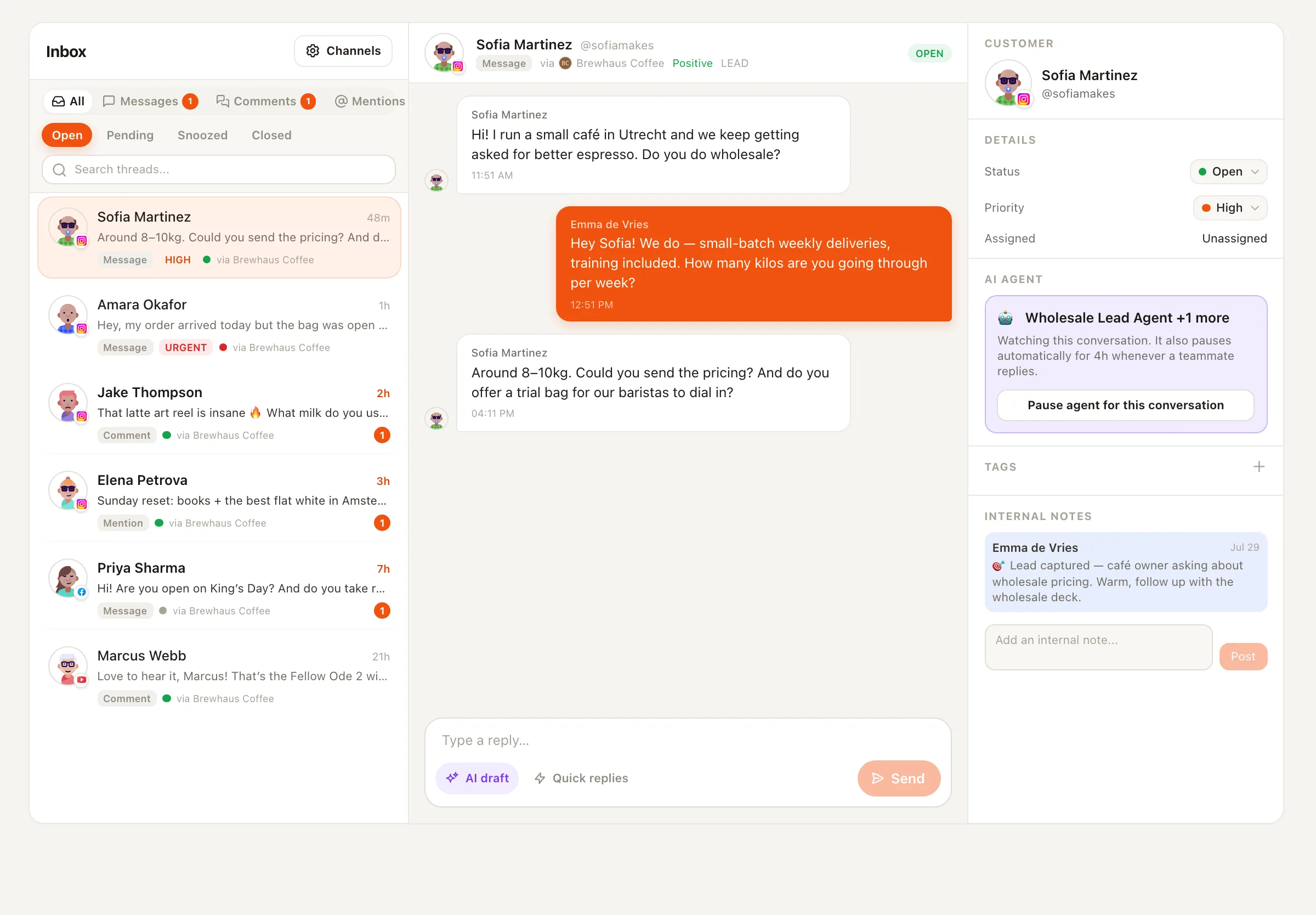
How a lead happens
01
A DM comes in: "do you have the hoodie in M? how much shipped to Berlin?" The agent reads the full conversation first — always.
02
Price, sizes, shipping times — only what you wrote in the catalog or what your connected live-data tools return. Nothing invented, in the customer's own language.
03
One question at a time, woven into the chat — "when would you need it by?" — following the checklist you configured. Never an interrogation.
04
Real intent shown? It shares your checkout link with a low-pressure nudge, tags the thread "Lead", sets hot or warm priority, and leaves a 🎯 note with everything it learned.
The handoff
Lead capture isn’t a spreadsheet export — it happens inside the conversation, where your team already works.
Every captured lead tags the thread "Lead" and sets a temperature — hot leads go urgent, so the team is notified immediately instead of finding them tomorrow.
Name, contact details, what they want, and the answers to your qualification questions — summarized in one internal note on the thread.
Orders over a threshold, wholesale inquiries, press, refunds — whatever you list as human-only gets a polite holding reply and an escalation, not an improvised answer.
Asked if it's a bot, it says it's the shop's assistant and a human is always available. It never asks for card numbers or passwords — payments only happen through your configured links.
What you configure once
Your catalog
Products, services, prices, options, shipping — the agent only states facts written here. "No discounts except the newsletter code" is a fact too.
Your links
Checkout, booking page, size guide. The agent only ever shares links from this list — at the right moment, never as an opener.
Your qualification checklist
Budget, timeline, which product, company size — whatever tells you a lead is worth chasing. Asked one at a time, conversationally.
Your handoff rules
The conversations a human must own. The agent holds politely and escalates with the reason.
Live data via MCP (optional)
Inventory, order status, booking availability, CRM — connected once in workspace settings, looked up mid-conversation.
Keyword on a post triggers a DM — the automation opens the conversation, the sales agent works it.
Post-purchase questions and "where's my order?" go to the support agent, so this one stays focused on selling.
Tags, priorities, assignment rules, and SLA policies — the home where captured leads land.
The agent watches new DMs and comments on the channel you bind it to. When someone asks about your product, it answers from the catalog you wrote, weaves in your qualification questions one at a time, and the moment the person shares contact details or shows real buying intent, it captures the lead — thread tagged, priority set, handoff note written for your team.
The conversation gets tagged "Lead" in your inbox, a priority of hot or warm, and a 🎯 handoff note summarizing everything the agent learned: name, contact details, what they're interested in, and the answers to your qualification questions. Hot leads are marked urgent so your team is notified immediately.
Never — that's a hard rule, not a setting. It only states facts from your catalog or your connected live-data tools. If something isn't written there, it says "let me check that for you" and escalates to your team. It never offers discounts or negotiates prices unless your catalog explicitly allows it, and payments only ever happen through the links you configured.
Yes. Connect your inventory system, booking tool, or CRM as MCP servers in workspace settings and the agent can look up live stock, availability, or customer records mid-conversation — instead of guessing or going silent.
Your choice per agent. Draft mode (the default) attaches each suggested reply for your team to review and send — and the agent learns from every edit. Auto mode replies directly, rate-limited to five replies per conversation per hour, and stands down for around four hours whenever a teammate joins the thread. You can also pause it on any single conversation.
It binds to WhatsApp Business, Facebook Pages, X, Telegram and Instagram through Nimply's unified inbox. WhatsApp chats, Facebook Page DMs and comments, Instagram DMs and comments, X DMs and Telegram DMs are all live today (an Instagram account connected before Meta's 17 September approval needs reconnecting once) — connect your channels, write your catalog, and configure the agent.
Hire the Sales & Lead Agent free, paste in your catalog and links, and let it work your inbox.