

🤝 Two sides, one calendar
Client approval for social media — without the screenshot deck
The old way to get client approval for social media posts: screenshot every draft into a deck, email it, wait four days, decode “can we make it pop?”, rebuild the deck. The Nimply way: invite the client into their own workspace, where they review the real calendar and approve real drafts — while your team keeps working on the same screen.
Your side · the agency
Editor / AdminDraft, revise, schedule
- Write posts — or let AI agents draft them — inside the client's workspace
- Submit each draft for approval with channels, media, and timing attached
- Revise the same live draft when feedback lands; resubmit in seconds
- Schedule approved posts and let the calendar publish them
Their side · the client
Owner / Admin — or ViewerSee, review, approve
- Log in to their own workspace — their brand only, never your other clients
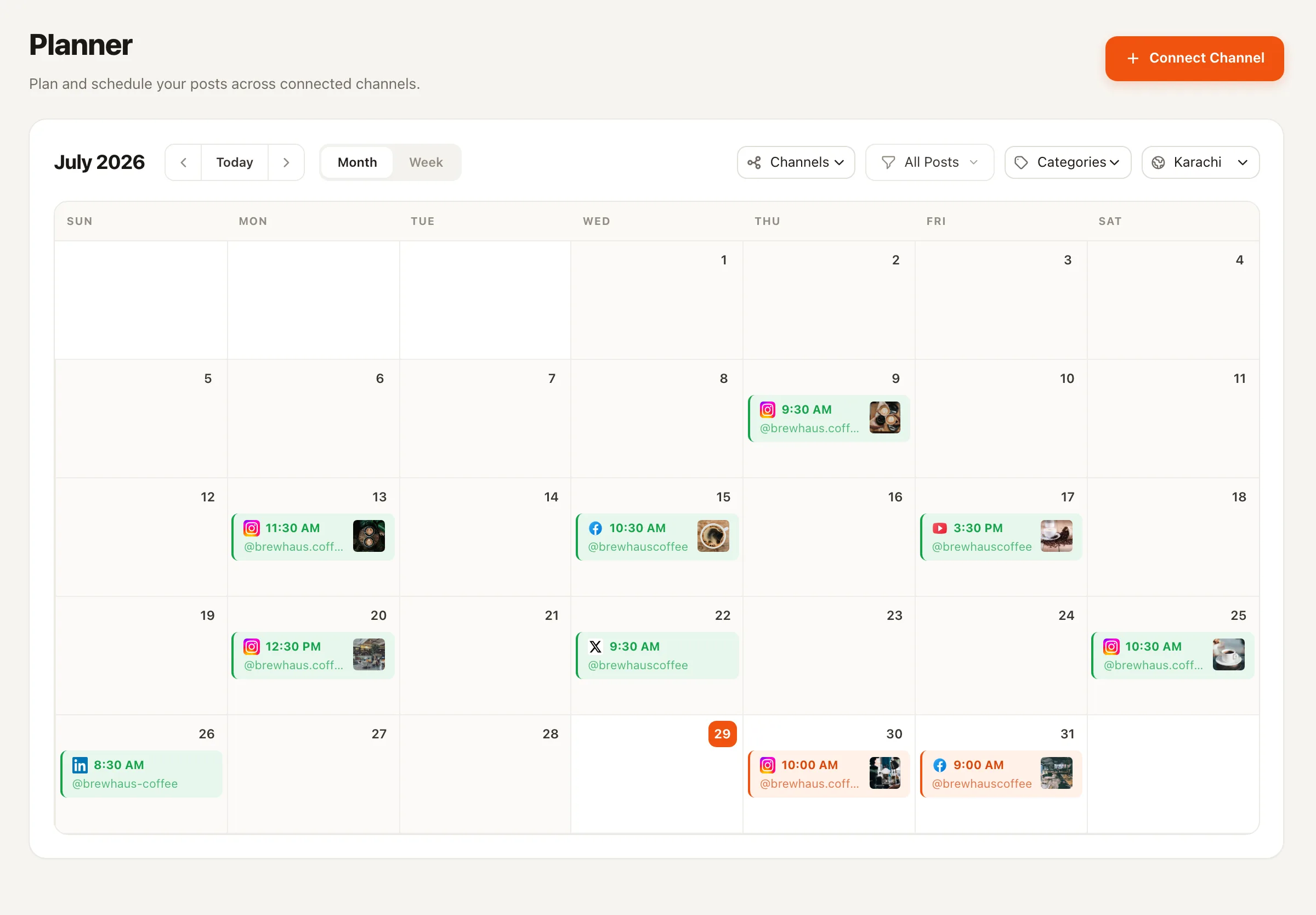
- See the live calendar exactly as it will publish, not a stale export
- Approve pending drafts themselves (Admin/Owner) or review read-only (Viewer)
- Watch approved posts move to scheduled — no status-update emails needed
The old way
The screenshot-deck death spiral
It starts innocently: you paste next week’s posts into a deck and email it over. Then the deck comes back with comments on slide 4 — but which post is slide 4 in your scheduler? You revise, re-screenshot, re-send. Meanwhile the client forwards version two to their CEO while you’re annotating version three. Nobody knows which version is true, approval takes a week, and the “approved” deck still has to be manually re-entered into the actual scheduling tool — one more chance for the published post to differ from the approved one.
Every step of that loop exists because the review artifact and the publishing system are two different things. Merge them and the spiral disappears: the client reviews the real draft in the real calendar, and approval itself moves the post forward.
The honest model
One workspace per client, roles at the door
In Nimply every client lives in their own workspace, with its own channels, calendar, AI agents, and credits — hard walls, not filters. Client review works by inviting the client into that workspace with the role that fits your relationship: hands-on clients take an approving role and sign off on drafts themselves; lighter-touch clients join as Viewers, see everything, and leave the statuses to you.
Either way the revision loop runs through one live object. Client wants changes? Your editor updates the same draft and resubmits — approved posts flow straight to the schedule via the same approval workflow that governs your whole team, AI agents included.
Built for the client business
Agencies and freelancers run on approvals
Agencies
Ten clients, ten workspaces, zero crossed wires
Separate workspaces mean a client can never glimpse another client’s calendar, and each brand’s approval gate is exactly as strict as that client wants it. Onboarding a new account is a workspace, channels, and an invite.
Freelancers
Look like an operation, not an inbox
A freelancer sending decks competes on patience. A freelancer whose client logs into a live calendar and taps approve competes on process — and wins the renewal conversation before it starts.
Client approval — FAQ
How does client approval work in Nimply?
You run each client in their own workspace and invite the client into it as a member. They log in and see the real calendar and real drafts — not screenshots. In the hands-on setup the client holds an approving role (Admin or Owner) and signs off on drafts themselves; in the lighter setup they join as a Viewer, review the calendar read-only, and send feedback while your team handles the statuses.
Does the client need a Nimply login?
Yes — honest answer. Client review happens inside the workspace, so the client accepts an invite and signs in. There are no external no-login approval links or email-approval flows; what you get instead is the client seeing the genuine, always-current calendar rather than a PDF that was stale the moment you exported it.
What exactly does the client see?
Their workspace only. Workspaces are fully separate — each has its own channels, posts, agents, and credits — so a client sees their brand's calendar, drafts, and scheduled posts, and never another client's work. Within their workspace they see posts as they'll really publish: caption, media, target channels, and timing.
How do revision loops work?
The draft is the single source of truth. The client reviews a pending post and either approves it or asks for changes; your editors revise the same draft and resubmit. Because everyone is looking at one live object instead of v3-final-FINAL attachments, there is nothing to reconcile afterwards.
Can the client mess up our scheduling?
You choose their power level. As a Viewer they can't touch anything. With an approving role they control sign-off — which is the point — while your team continues to own drafting and the day-to-day calendar. Roles are per-workspace, so how much control a client has is decided client by client.
Does this work with AI-drafted content too?
Yes. Drafts written by Nimply's AI agents enter the same pipeline as human drafts and wait for the same sign-off — agents never publish directly. For an agency that means you can let agents accelerate production per client workspace while the client's approval gate stays exactly as strict.
Retire the screenshot deck this week
Create a workspace for your next client, invite them in, and let approval happen where the posts actually live.